Lloyd's Robot Vocal: a Free Robot Voice VST3 That Raps Your Lyrics on the Beat
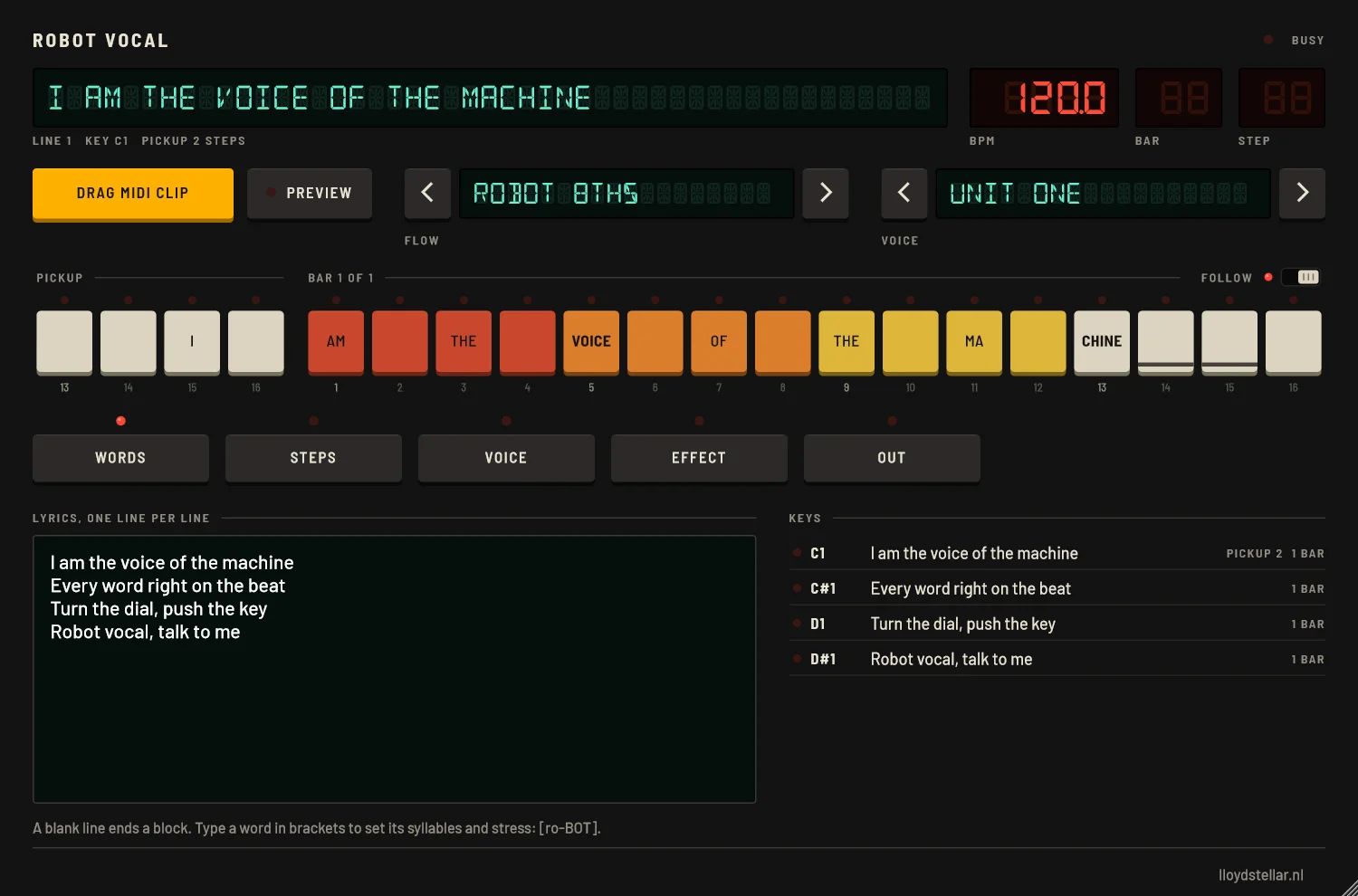
Robot Vocal is an instrument plug-in that raps your lyrics with a robot voice. You type the words, pick a flow and a voice, and every syllable lands on the beat of your song, at the tempo of your Live set. Each line of the lyrics gets its own MIDI key, and the plug-in makes the MIDI clip for you. There are 49 voices from old speech chips, home computers and talking machines, 17 rap flows, and vocoders, talkboxes and delays to put on top.
Download Robot Vocal 0.1.0
Pick the zip for your computer. Both hold the plug-in and the manual; the Mac zip also has an install script. The install steps are further down this page.
On your phone: Robot Vocal for Android on Google Play, free as well.
Windows: VST3 · macOS 11 or later, Apple Silicon and Intel: VST3 and Audio Unit · The manual is written for Ableton Live 12
Why I made it
I am crazy about retro computer voices. The talking computers of electro, the speech chip in an old spelling toy, a voice that sounds like it lives in a beige box. Vocoder and robot vocals are part of my own sound, and getting a robot vocal exactly on the beat was always a fiddly job. Render the speech, chop it up, nudge every syllable onto the grid, and start again when you change one word.
In Robot Vocal that part is automatic. You type a line, choose a flow, and the plug-in puts the syllables on the steps of the bar. The flows are rap flows: robot 8ths, the electro 3+3+2 bounce, one word per beat, triplets, half-time trap and twelve more. Every flow works at any tempo, but each one sounds best inside its own BPM range, so the table of flows below lists those ranges.
I built it because I wanted it for myself, and I will be using it a lot. It is handy for other producers too, so the VST3 is free to download and use on Windows and Mac.
How it works
-
Load it on a MIDI track
Make a MIDI track in Live and drag Robot Vocal onto it from Plug-Ins in the browser. The panel opens with four lines of example lyrics.
-
Type your lyrics
On the WORDS page: one rap line per line. Leave a blank line between verses. If a word is split into syllables the wrong way, type it in brackets with the stressed syllable in capitals, for example [ro-BOT].
-
Pick a flow and a voice
Use the arrows next to the FLOW and VOICE displays, or click a display for the full list.
-
Press PREVIEW
While Live stands still, PREVIEW plays your lyrics round and round on an example beat that suits the flow, at the tempo of your set. Change the flow or the voice and you hear the result as soon as it is ready. The example beat never ends up in an export.
-
Drag the MIDI clip
Drag the amber DRAG MIDI CLIP key into the arrangement, onto the Robot Vocal track. You get one note for every line. The clip starts with a bar of silence for the pickup of the first line, then loops the song. Drag its right edge to make the song repeat.
-
Press play
Press play in Live. Change the lyrics or the flow later and a lamp lights under the drag key: LINES CHANGED: DRAG THE CLIP AGAIN. Drag it again and delete the old clip.
How the lines play
Every line of the lyrics is a key. The first line is C1, the second C#1, the third D1, and so on up the keyboard (you can move the first key on the OUT page). A note plays its line from the first bar line after the note starts, at the tempo of your set.
Many lines start with a short word before the bar line, such as the "I" in "I am the voice of the machine". That is the pickup. Start the note a beat early and the pickup sounds there; start it right on the bar line and the flow fits all the words in the bar. Let go of the note and the line finishes the syllable it is in. Hold the note past the end of the line and the next line follows, up to a blank line in the lyrics.
Robot Vocal reports a latency of 150 ms to Live, so the consonants before a beat can sound before it. Live compensates for that by itself.
17 rap flows, and their tempo
A flow is the way the syllables are placed in the bar. Stressed syllables fall on the strong steps, and syllables in a bar is how many the flow fits in one bar. The BPM column is the tempo range a flow suits best. Every flow plays at any tempo, but it sounds better when your song is somewhere in its range.
Click the FLOW display for the list: the flows come in four groups by tempo, and the lit lamp marks the one you have. A single line can also get a flow of its own on the STEPS page.

| Flow | BPM | Syllables in a bar | How it goes |
|---|---|---|---|
| Under 100 BPM | |||
| 16th Rapid Fire | 80-100 | 12-16 | A syllable on almost every 16th note.Think of Blazing Arrow |
| Boom Bap Laid Back | 84-100 | 8-13 | Dense, with swing, a little behind the beat.Think of 90s boom bap |
| Pickup Flow | 85-100 | 8-12 | Lines that start on the last 16ths of the bar before.Think of 99 Problems |
| 100 to 120 BPM | |||
| Old-School Couplet | 95-115 | 6-9 | Early rap: even lines with the rhyme on beat 4.Think of Kurtis Blow |
| 120 to 145 BPM | |||
| Electro 3+3+2 | 105-140 | 6-10 | Syllables in groups of 3, 3 and 2 16th notes: the electro bounce.Think of Egyptian Lover, Cybotron |
| Robot 8ths | 110-140 | 4-8 | One syllable on every 8th note, flat and even.Think of The Robots, Pocket Calculator |
| Word Per Beat | 115-140 | 4-8 | Every word starts on a beat. Good for lists and commands.Think of Numbers, Technologic |
| Call and Response | 115-140 | 4-7 | A line in one bar, its answer in the next.Think of Planet Rock |
| Countdown | 128-136 | 3-5 | One word per beat, for counts and lists.Think of Numbers, Expo 2000, Computer World |
| Backbeat Pop | 128-138 | 4-6 | Words around beats 2 and 4, so the kick has beats 1 and 3.Think of Planet Rock |
| Shuffle Bot | 128-140 | 5-8 | Swung 8ths on a triplet grid.Think of Pack Jam, Egypt Egypt |
| Mantra | 128-142 | 5-8 | A short hook every half bar, each with a pickup.Think of It's More Fun to Compute, Musique Non Stop |
| Triplet Flow | 120-150 | 9-12 | Three syllables per beat.Think of Versace, Bad and Boujee |
| Dotted Drive | 130-142 | 5-6 | Syllables a dotted 8th apart (3+3+3+3+2+2).Think of Aux 88, Anthony Rother |
| Command | 130-142 | 3-6 | Short commands on beats 1 and 2, then a long rest.Think of Jam On It, Destroy Him My Robots |
| Stutter Snap | 130-150 | 6-8 | Short snaps on each beat.Think of the Scotch snap: short, then long |
| 145 BPM and up | |||
| Half-Time Trap | 130-160 | 6-10 | A half-time feel over two bars.Think of trap, UK drill |
49 robot voices in six banks
The voices come in six banks, one for each kind of voice machine. Click a bank on the VOICE page, then a voice; the line under the buttons says what it sounds like. NOTE sets the note the voice raps on, FEEL moves each vowel a little after its step (at 0 % the vowel sits exactly on the step, where robot voices sound best), and GATE sets how long the syllables sound.
| Bank | Voices | What you get |
|---|---|---|
| Formant | 5 | Clean synthesizer voices: Unit One, Allophone (jumps from sound to sound like a 1970s speech chip), Robovox, Tin Man and the big, low Deep Unit. |
| 8-bit | 5 | Three tones restarted on every pulse, in 4 bits: the software voice of the early home computers. Home Micro, Stuffed, Tiny Bot, Visitor and Crisp Micro. |
| Whackintalk | 18 | From Desktop (low, level and a little nasal, like a desktop computer of 1984) to Gravel, Alien, Underwater and Bleat. Five of them sing over your notes: Arpeggio, Fanfare, Mountain King, Dirge and Organ. |
| Flite | 1 | Kal, the diphone voice of 1990s speech software, at 8 kHz. |
| LPC chip | 1 | Speller: a talking spelling toy of 1978, ten poles at 8 kHz, 8 bits. |
| eSpeak NG | 19 | Robosoft 1 to 8, Unirobot, Anika Robot (a female robot), five Klatt synthesizers, Whisper, Croak and eSpeak's plain male and female voices. |


Vocoders, talkboxes and delays
The EFFECT page has three slots in a row. The full list with a line per effect is at the end of the manual.
| Slot | Choices | For example |
|---|---|---|
| Robot | 21 | The effect on the voice itself. Brazen Head I, II and III (a twenty-band vocoder on a raw saw, a choir of detuned minor triads or a sub bass), Sixteen Channel, Supersaw Choir, the talkboxes Mouth Tube and Talk Tube, Spelling Chip, Exterminator (ring modulation at 30 Hz), Bass Droid, Whisper Unit and Eight Bit. The vocoders and talkboxes play on the note set on the VOICE page. |
| Motion | 10 | Comes after the robot: Ensemble (three drifting copies, like the choir ensembles of 1979), Filter Sweep, Beat Repeat, Tape Stop on the last word of every line, Wide Chorus and Auto Pan. |
| Space | 14 | The room around the voice: Delay 3/16 (the classic electro bounce), Dub Delay, Echo Throw (only the last word of a line echoes, as in rap records), Gated Plate, Reverse Swell and two ping-pong delays. |

Fixing a syllable by hand
The flow places the syllables, and most of the time that is it. When one syllable should sit somewhere else, open the STEPS page and click it on the step row. EARLIER and LATER move it one step while the rest of the line stays put, SHORTER and LONGER set how many steps it sounds, STUTTER repeats its start 2, 4 or 8 times (ro-ro-ro-robot), and a click on the little keyboard gives it a note of its own. On the right you spread a line over 1 to 4 bars, give it its own flow, or press REFLOW to let the flow place it again.


The OUT page has the rest. DRAG KEY NAMES makes a MIDI Effect Rack for Live; put it to the left of Robot Vocal and the piano roll shows the words of each line on its key. DRAG AUDIO gives you the song as a WAV at the tempo of your set, the loop of the MIDI clip from the bar line of the first line, ready to drop on an audio track.
How to install Robot Vocal
Windows
- Close Ableton Live.
- Unzip the download.
- Copy the folder Robot Vocal.vst3 to C:\Program Files\Common Files\VST3. Windows asks for permission to copy to this folder: click Continue.
- Start Live. Open Settings (Ctrl+,), go to Plug-Ins and turn on Use VST3 Plug-In System Folders.
- If Robot Vocal does not show up under Plug-Ins in Live's browser, click Rescan in the same settings.
Robot Vocal.vst3 is a folder, not a single file. Copy the whole folder: the eSpeak NG voices read their data from inside it.
macOS
The download works on Apple Silicon and Intel Macs with macOS 11 or later. Robot Vocal is not yet signed by a registered Apple developer, so macOS blocks it until the install script has run. The script takes care of that.
- Close Ableton Live.
- Unzip the download. You get a folder with Robot Vocal.vst3, Robot Vocal.component, install.command and README.txt.
- Open Terminal (Applications > Utilities > Terminal).
- Type bash and a space, drag install.command from the folder into the Terminal window, and press Return.
- Start Live. Open Settings (Cmd+,), go to Plug-Ins and turn on Use VST3 Plug-In System Folders. Click Rescan if Robot Vocal does not show up.
The script copies the VST3 to ~/Library/Audio/Plug-Ins/VST3 and the Audio Unit to ~/Library/Audio/Plug-Ins/Components. You can copy them there yourself too, but then run this in Terminal afterwards, or macOS will not load them:
xattr -dr com.apple.quarantine ~/Library/Audio/Plug-Ins/VST3/"Robot Vocal.vst3" ~/Library/Audio/Plug-Ins/Components/"Robot Vocal.component"
Robot Vocal on your phone
The same robot rapper is an Android app. Type a line, set the BPM, pick a flow and a voice, and hear it over an example beat: electro, Miami bass, boom bap, half-time, house, techno or a click. SAVE WAV writes a loop of whole bars for any DAW, and SEND TO LIVE puts the vocal on a new track in your Live Set with Lloyd's App2Live, warped to the tempo of the Set.
The app has no account, no ads and no tracking. It is free and open source under the GNU GPL 3.0, with the source on GitHub and its privacy policy on this site.
Frequently asked questions
Is Robot Vocal free?
Yes. The VST3 for Windows, the VST3 and Audio Unit for Mac and the manual are free downloads, with no account, no trial and no paid version.
Which computers does it run on?
Windows, as a VST3. macOS 11 or later on Apple Silicon and Intel Macs, as a VST3 and an Audio Unit. The manual is written for Ableton Live 12.
Why does macOS block the plug-in?
Robot Vocal is not yet signed by a registered Apple developer, so macOS blocks it until the install script has run. The script copies the plug-ins to your Plug-Ins folders and takes care of the block.
Robot Vocal does not show up in Live. What now?
Check that the plug-in is in the right folder. In Live's Settings, Plug-Ins, turn on the system folders and click Rescan. On a Mac, run the install script.
The eSpeak NG voices are silent. Why?
The plug-in folder was not copied whole. Robot Vocal.vst3 is a folder, and the eSpeak NG voices read their data from inside it. Copy the whole folder again.
The lines do not fall on their bars. What is wrong?
The clip in Live is older than the lyrics. When the lamp under DRAG MIDI CLIP is lit, drag the clip again and delete the old one.
PREVIEW makes no sound.
Stop Live first. PREVIEW only plays while Live stands still.
A word sounds wrong. Can I fix it?
Type it in brackets with a hyphen between the syllables and the stressed syllable in capitals, such as [ro-BOT].
Is there a version for my phone?
Yes. Robot Vocal is also a free Android app on Google Play. It saves WAV files and can send the vocal straight to Ableton Live with Lloyd's App2Live.
More free tools, and the music they are for
Robot Vocal is one of the free music tools on this site, next to the online TR-808 and the two Lasers plugins. Machine-like beats and vocoder vocals are what my own electro is made of; you can hear it on Bandcamp, and the story behind the studio is on the About Me page.